


Meteostation (temperature regulator) RTM 2000
Meteostation (temperature regulator) RTM 2000
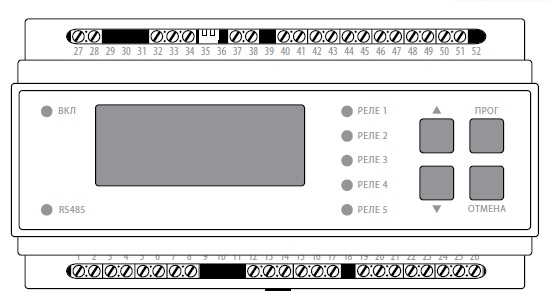
Procedure for setting the main parameters of the controller
|
Selection of control algorithm
|
1. Press the regulator key (PROG), the password entry menu opens 2. Use the keys (UP and DOWN) to enter the password 117 3. Press the PROG key to enter and save the value we need.
|
|
How to set the upper and lower limits of the electric heating switch-on temperature
|
1. Press the controller key (PROG) to enter the mode of selecting the upper and lower limits of the electric heating switch-on temperature. The air temperature: MINIMUM and MAXIMUM will be immediately displayed 2. Use the (UP i DOWN) keys to select the desired value for each boundary 3. Press the PROG key to save the values we need.
|
|
Procedure for setting the sensitivity of precipitation sensors 1 and 2
|
1. Press the regulator key (PROG) to enter the mode of selection of sensitivity of precipitation sensors 1 and 2. Precipitation Sensitivity will be displayed immediately. 2. Use the keys (UP and DOWN) to select the required value for each sensor DO1 or DO2. 3. Press the PROG key to save the values we need.
|
|
Procedure for setting the sensitivity of water sensors 1 and 2
|
1. Press the regulator key (PROG) to enter the mode of selecting the sensitivity of water sensors 1 and 2. WATER SENSITIVITY will be displayed immediately. 2. Use the keys (UP and DOWN) to select the required value for each sensor DV1 or DV2. 3. Press the PROG key to save the values we need.
|
|
Setting the sensitivity of water sensors 3 and 4
|
1. Press the regulator key (PROG) to enter the mode of selecting the sensitivity of water sensors 1 and 2. WATER SENSITIVITY will be displayed immediately. 2. Use the keys (UP and DOWN) to select the required value for each sensor DV3 or DV4. 3. Press the PROG key to save the values we need.
|
|
Procedure for setting the delay timer by 4 channels |
1. Press the controller key (PROG) to enter the 4-channel delay timer setting mode. The DELAY TIMERS will be displayed immediately 2. Use the (UP i DOWN) keys to select the required value for each timer T1, T2, T3 or T4. 3. Press the PROG key to save the values we need.
|
|
Procedures for setting the surface support temperature of outdoor areas. Temperature channels 3 and 4 |
1. Press the controller key (PROG) to enter the surface support temperature setting mode for outdoor areas. The TOP TEMPERATURE will be displayed immediately. 2. Use the keys (UP and DOWN) to select the required temperature value for channel 3 or 4. 3. Press the PROG key to save the values we need.
|
Procedure for forced switching on of the electric heating system
- Switch on the automatic switch of forced switching on in the control cabinet, which will close the “Bx1” input terminals, after which the system will enter the “Defrost” mode, in which all heating zones will be forced to switch on regardless of the presence/absence of precipitation or melt water.
Meteostation (temperature regulator) RTM 2000
Procedure for setting the main parameters of the controller
|
Selection of control algorithm
|
1. Press the regulator key (PROG), the password entry menu opens 2. Use the keys (UP and DOWN) to enter the password 117 3. Press the PROG key to enter and save the value we need.
|
|
How to set the upper and lower limits of the electric heating switch-on temperature
|
1. Press the controller key (PROG) to enter the mode of selecting the upper and lower limits of the electric heating switch-on temperature. The air temperature: MINIMUM and MAXIMUM will be immediately displayed 2. Use the (UP i DOWN) keys to select the desired value for each boundary 3. Press the PROG key to save the values we need.
|
|
Procedure for setting the sensitivity of precipitation sensors 1 and 2
|
1. Press the regulator key (PROG) to enter the mode of selection of sensitivity of precipitation sensors 1 and 2. Precipitation Sensitivity will be displayed immediately. 2. Use the keys (UP and DOWN) to select the required value for each sensor DO1 or DO2. 3. Press the PROG key to save the values we need.
|
|
Procedure for setting the sensitivity of water sensors 1 and 2
|
1. Press the regulator key (PROG) to enter the mode of selecting the sensitivity of water sensors 1 and 2. WATER SENSITIVITY will be displayed immediately. 2. Use the keys (UP and DOWN) to select the required value for each sensor DV1 or DV2. 3. Press the PROG key to save the values we need.
|
|
Setting the sensitivity of water sensors 3 and 4
|
1. Press the regulator key (PROG) to enter the mode of selecting the sensitivity of water sensors 1 and 2. WATER SENSITIVITY will be displayed immediately. 2. Use the keys (UP and DOWN) to select the required value for each sensor DV3 or DV4. 3. Press the PROG key to save the values we need.
|
|
Procedure for setting the delay timer by 4 channels |
1. Press the controller key (PROG) to enter the 4-channel delay timer setting mode. The DELAY TIMERS will be displayed immediately 2. Use the (UP i DOWN) keys to select the required value for each timer T1, T2, T3 or T4. 3. Press the PROG key to save the values we need.
|
|
Procedures for setting the surface support temperature of outdoor areas. Temperature channels 3 and 4 |
1. Press the controller key (PROG) to enter the surface support temperature setting mode for outdoor areas. The TOP TEMPERATURE will be displayed immediately. 2. Use the keys (UP and DOWN) to select the required temperature value for channel 3 or 4. 3. Press the PROG key to save the values we need.
|
Procedure for forced switching on of the electric heating system
- Switch on the automatic switch of forced switching on in the control cabinet, which will close the “Bx1” input terminals, after which the system will enter the “Defrost” mode, in which all heating zones will be forced to switch on regardless of the presence/absence of precipitation or melt water.
